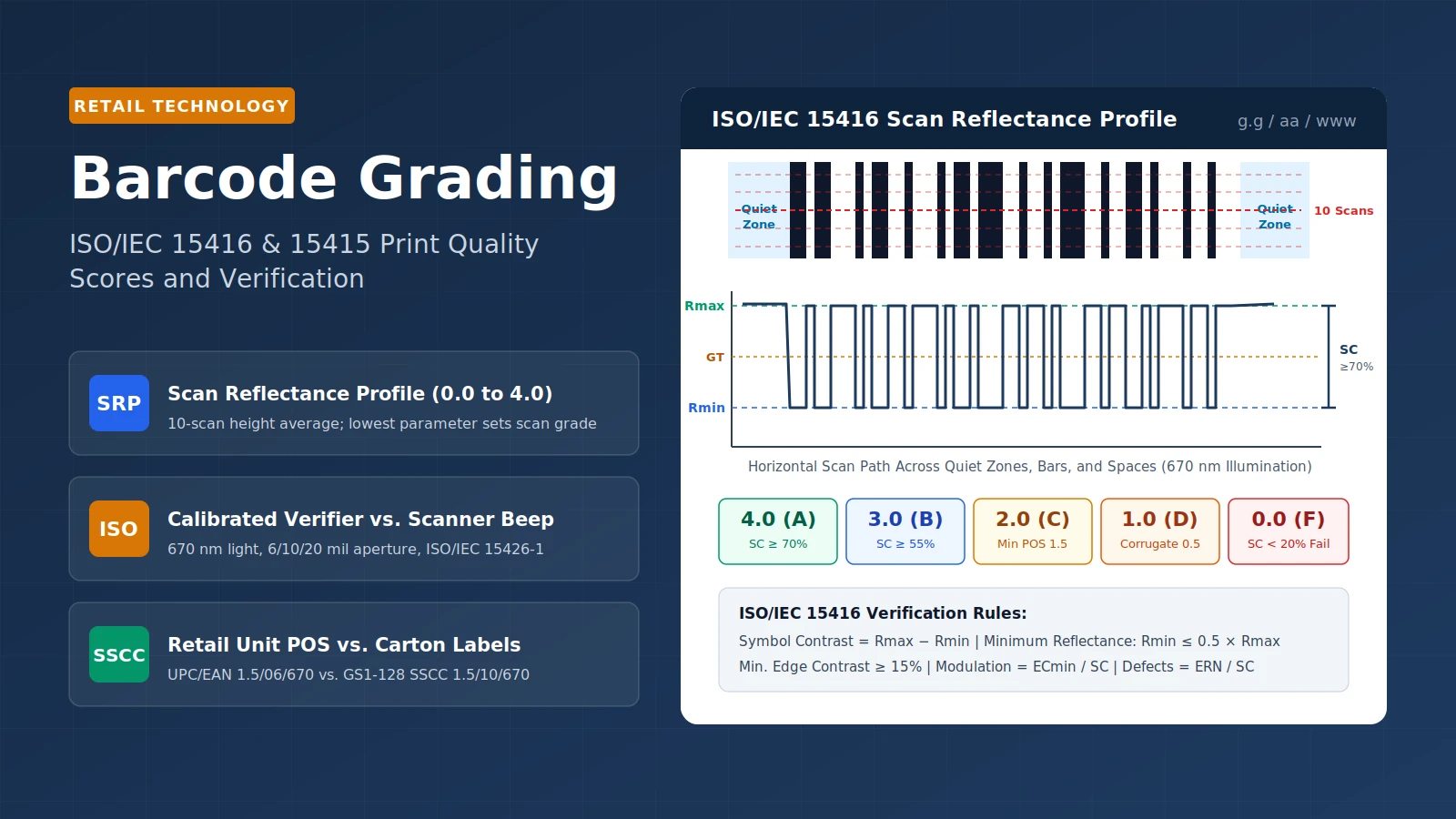
Barcode grading evaluates printed linear symbols under ISO/IEC 15416 and two-dimensional symbols under ISO/IEC 15415 on a 4.0 numeric scale using calibrated scan reflectance profiles rather than a single handheld beep. Because individual parameters report their lowest reading across ten height scans, one weak defect can fail retail checkout or receiving verification.
Retail buyers, store managers, and private-label teams run into non-scan delays when labels pass a quick counter test yet stall at automated receiving docks or omnidirectional point-of-sale lanes. Pair these verification criteria with our retail technology planning hub and our guide to self-checkout kiosk planning when troubleshooting lane throughput and scanning reliability.
How does ISO/IEC 15416 and ISO/IEC 15415 barcode grading score print quality?
Under ISO/IEC 15416 referenced in FDA UDI labeling guidance, linear barcode grading averages scan reflectance profile grades across at least 10 scan lines spaced evenly over the symbol height, expressing the overall grade to one decimal place on a 4.0 scale alongside the measuring aperture and illumination wavelength. Two-dimensional symbols use ISO/IEC 15415.
Scan reflectance profile parameters and grade thresholds
In GS1 linear verification procedures built on ISO/IEC 15416, the overall linear score is always written in the structured notation g.g/aa/www. The first field (g.g) reports the arithmetic mean of at least 10 individual scan grades to one decimal place on a 4.0 scale, the second field (aa) is a two-digit reference approximating the measuring aperture in thousandths of an inch (mils), and the third field (www) states the light source wavelength in nanometres, set to 670 nm ± 10 nm where adjustable.
Crucially, individual scan parameters are never averaged into a flattering middle number: each parameter is reported at the lowest grade achieved across the scan set. A single failing reflectance check—such as light bars failing Minimum Reflectance or a localized ink void pushing Defects past the failure limit—pulls that scan profile down to 0 and drags the overall symbol grade downward.
The table below lists the seven scan reflectance profile parameters evaluated on every linear scan line under GS1 and ISO/IEC 15416 guidelines.
| ISO Parameter | Measurement Formula or Rule | Grade 4 (A) | Grade 3 (B) | Grade 2 (C) | Grade 1 (D) | Grade 0 (F) |
|---|---|---|---|---|---|---|
| Decode | Reference symbology decode and global threshold crossing | Pass (4) | Pass/fail only | Pass/fail only | Pass/fail only | Fail (0) |
| Symbol Contrast | Rmax − Rmin (highest space minus darkest bar) | ≥ 70% | ≥ 55% | ≥ 40% | ≥ 20% | < 20% |
| Minimum Reflectance | Darkest bar reflectance relative to brightest space | ≤ half of Rmax | Pass/fail only | Pass/fail only | Pass/fail only | > half of Rmax |
| Minimum Edge Contrast | Space Reflectance (min) − Bar Reflectance (max), worst pair | ≥ 15% | Pass/fail only | Pass/fail only | Pass/fail only | < 15% |
| Modulation | Edge Contrast (min) / Symbol Contrast | ≥ 0.70 | ≥ 0.6 | ≥ 0.5 | ≥ 0.4 | < 0.4 |
| Defects | Element Reflectance Non-Uniformity (ERN) / Symbol Contrast | ≤ 0.15 | ≤ 0.20 | ≤ 0.25 | ≤ 0.30 | > 0.30 |
| Decodability | Bar and space width margin against ideal module dimensions | ≥ 0.62 | ≥ 0.50 | ≥ 0.37 | ≥ 0.25 | < 0.25 |
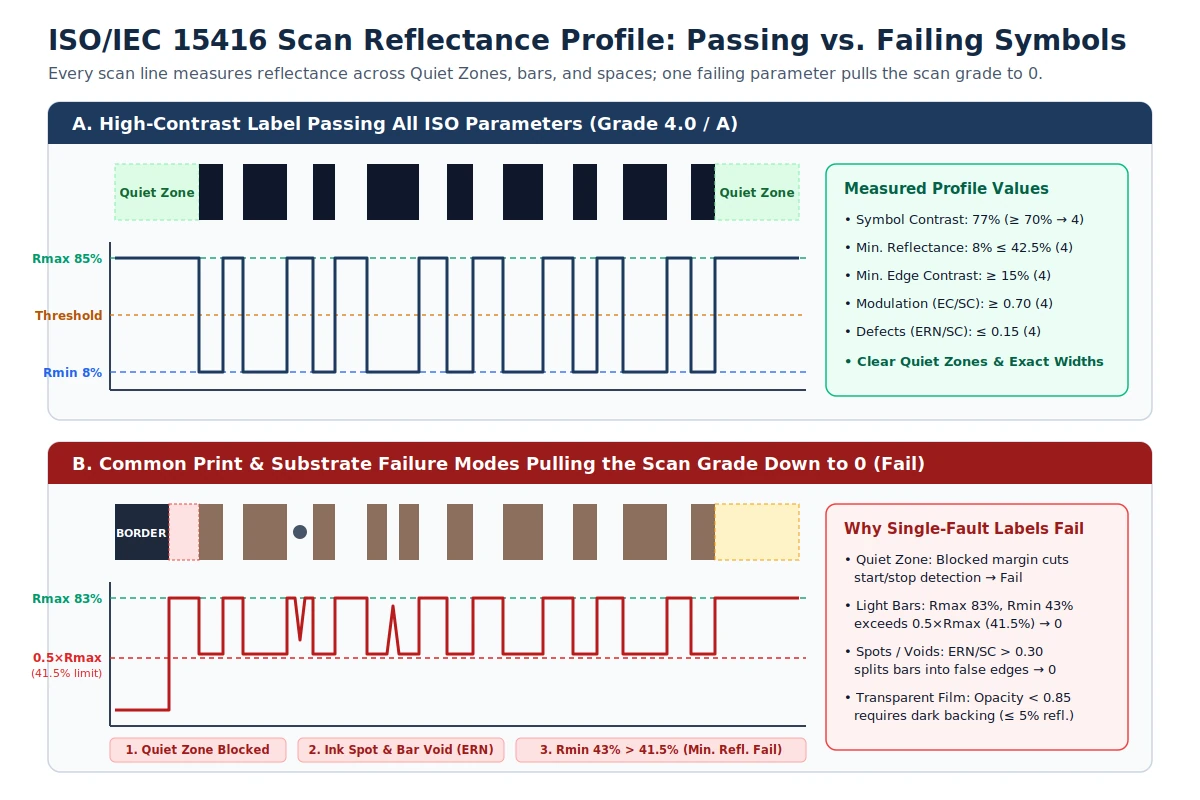
Minimum Reflectance catches a frequent private-label mistake: bars that look readable to the human eye but reflect too much red scanner light. In a documented GS1 verification example printed in light brown ink on white stock where Rmax measured 83%, at least one bar needed an Rmin of 41.5% or less to pass, so an actual Rmin of 43% failed Minimum Reflectance outright despite visually apparent contrast.
Two-dimensional ISO/IEC 15415 grading and QR module sizing
Two-dimensional matrix symbols such as data matrix codes and QR codes are governed by ISO/IEC 15415:2024 (Third Edition, December 2024), incorporated into federal IoT labeling rules. Those federal QR specifications reference ISO/IEC 18004 for standard matrices spanning 21 × 21 to 177 × 177 modules with a minimum module size of 0.254 mm × 0.254 mm and a print quality target of 1.5/(**)/660, where the aperture matches expected reading distance at 660 nm illumination.
In retail and packaging printing, choosing module size solely at the absolute floor invites bleeding and coalesced cells. As reported in peer-reviewed thermal transfer QR print quality research on PubMed Central, practical small-label QR symbols require at least about 0.36 mm per module, with 0.4 to 0.5 mm recommended for close-range mobile scanning, 0.5 to 1 mm for longer distances, and 0.7 to 1.2 mm for industrial automatic readers. QR symbols also incorporate four Reed–Solomon error correction levels—L (7% data recovery), M (15%), Q (25%), and H (30%)—to preserve decodability when minor print deformation occurs.
Common substrate and print failures behind single-parameter drops
Even when barcode artwork is digitally exact, physical printing and label placement introduce defects that drop ISO scores:
- Blocked Quiet Zones: Quiet Zones are the solid, light, unobstructed areas to the left and right of a linear barcode; crowding a price border, box seam, or graphic edge into either margin causes immediate verification failure.
- Spots, voids, and jagged bars: Spots of ink in Quiet Zones or spaces create reflectance valleys, while light voids inside dark bars create reflectance peaks measured as Element Reflectance Non-Uniformity (ERN). As highlighted in the FDA bar code label rule, jagged linear lines, degrading markings, and placement across perforations break scan integrity during normal handling.
- Substrate and ink transfer mismatch: Printing unit pressure, printing method, ink viscosity, layer thickness, and substrate whiteness, absorbency, structure, and smoothness directly govern how sharply the smallest bars or square modules reproduce.
- Transparent packaging show-through and seams: When barcodes print on transparent or semi-transparent film, product color behind the label can bleed through and collapse contrast. Under GS1 opacity testing, if substrate opacity is below 0.85, the label should be measured over a uniform dark backing with reflectance of 5% or less (or tested on the filled finished package), and every barcode should sit on a relatively flat panel clear of seams or seals.
- Mismatched human-readable text: If the Human Readable Interpretation (HRI) below a barcode is omitted or disagrees with the encoded bars, the symbol fails verification regardless of optical contrast.
Why does official barcode grading require a calibrated ISO verifier?
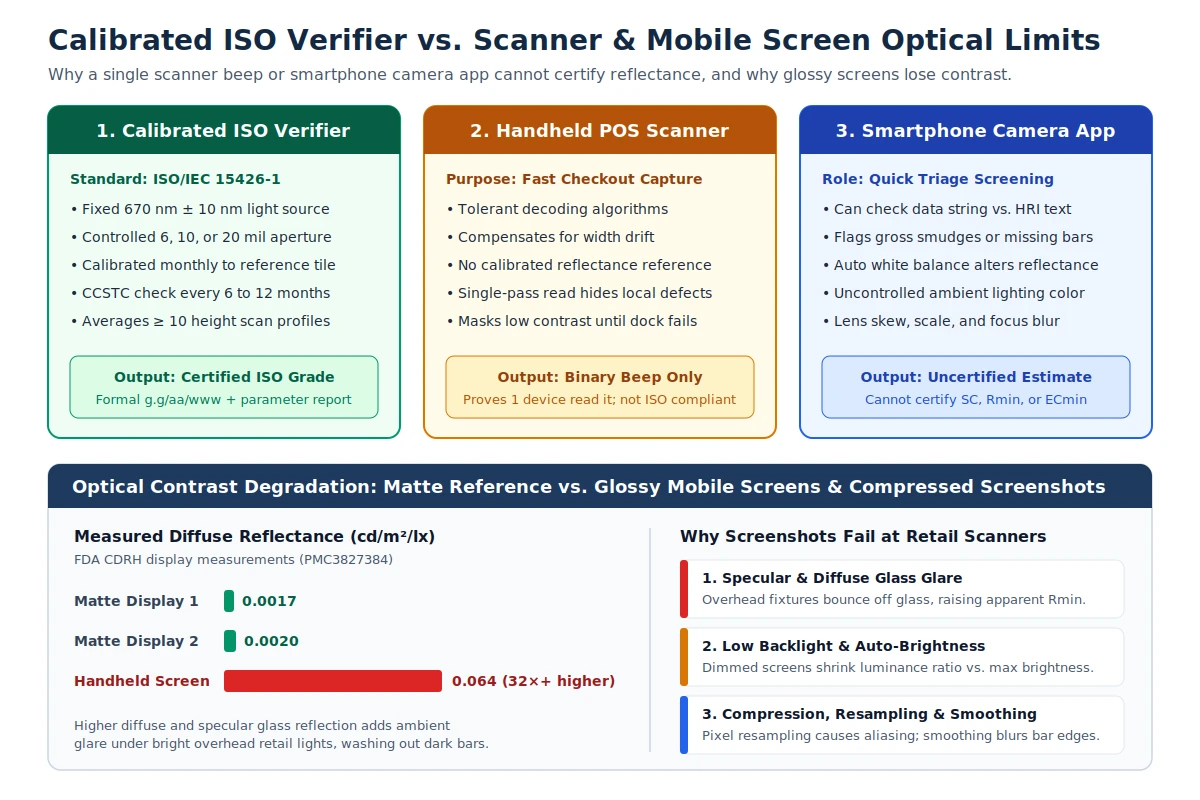
Checking an official barcode grade requires barcode verification equipment conforming to ISO/IEC 15426-1 because verifiers measure calibrated reflectance under fixed 670 nm ± 10 nm illumination and controlled apertures across at least 10 scan lines, whereas handheld POS scanners use tolerant decoding algorithms designed to read marginal labels without measuring optical compliance.
A handheld checkout gun is engineered to ring up a basket as fast as possible, not to act as a metrology instrument. As GS1 verification guidance explains, commercial scanners rely on edge-to-similar-edge decoding and tolerant algorithms that can compensate for bar width deviations or faded print on a single pass. Hearing one beep at a back-office desk proves only that one specific scanner decoded one path across the label under room light—not that omnidirectional checkout scanners or warehouse conveyor arrays will read the shipment reliably.
Formal ISO/IEC 15426-1 verifiers enforce repeatable optical geometry and traceable calibration:
- Fixed spectral illumination and aperture: Linear GS1 testing specifies a 670 nm ± 10 nm light source paired with the exact measuring aperture required for the symbology (6 mil, 10 mil, or 20 mil). Using the wrong aperture either exaggerates tiny print grain or hides real defects.
- Routine reflectance calibration: Verifiers require regular re-calibration to a traceable reflectance card or tile at least as frequently as recommended by the manufacturer or at least once a month, and immediately whenever the scan head, measuring aperture, or scan width changes.
- Periodic conformance correlation: Operators test verifier accuracy against a Calibrated Conformance Standard Test Card (CCSTC) whenever readings look suspect and at a minimum every six months to confirm that both the instrument and operator technique remain within published tolerances.
When stores tie shelf-edge labels and checkout scanners into perpetual stock tracking—such as the workflows covered in our guides on electronic shelf labels and POS synchronization and par level inventory replenishment—unverified print drift silently degrades scan accuracy until staff revert to manual keying.
What can smartphone barcode grading apps flag without certifying reflectance?
Smartphone barcode apps can decode encoded strings, catch Human Readable Interpretation mismatches, and spot gross smudges or missing bars during quick floor checks, but they cannot certify ISO reflectance parameters because camera sensors, automatic white balance, uncontrolled ambient light, and hand-held lens geometry distort reflectance and bar widths.
In camera-based barcode research (COCO-10) archived on PubMed Central, investigators documented two structural error sources whenever consumer smartphones photograph printed barcodes. First, color and reflectance values shift depending on camera sensor sensitivity, sensor gamut, and automatic white balance running under varying ambient illumination, alongside paper absorption and reflectance differences. Second, manual hand-held capture introduces geometric distortions—scale shifts, in-plane rotation, skew, perspective tilt, and focus blur—driven by lens optics, resolution, field of view, and camera-to-label alignment.
The table below separates what each inspection tool can and cannot establish in a retail operation.
| Inspection Tool | Optical Control | What It Can Confirm | Operational Certification Scope |
|---|---|---|---|
| Calibrated ISO/IEC 15426-1 Verifier | 670 nm ± 10 nm light, 6/10/20 mil aperture, monthly calibration, six-month CCSTC | Certified overall grade (g.g/aa/www) plus all seven scan reflectance parameters across ≥ 10 scans | Certifies ISO/IEC 15416 compliance for trading partners and receiving compliance |
| Handheld Retail POS Scanner | Uncontrolled ambient mix; single consumer decode engine | Whether one specific reader decodes one scan path | Tolerant decoding algorithms mask low contrast, narrow quiet zones, and width drift |
| Smartphone Camera App | Consumer camera sensor, automatic white balance, variable room light, handheld angle | Decoded number vs. printed HRI, obvious tears, missing bars, or gross print smears | Sensor gamut, white balance, skew, and focus blur prevent calibrated Rmax and Rmin measurement |
When do retailers need third-party verification reports versus in-house checks?
Private-label buyers and suppliers need third-party verification reports at packaging design approval and on finished, market-ready products before shipping to strict retail trading partners, while ongoing in-house checks remain mandatory because a lab report grades only the exact samples submitted rather than every subsequent label run.
As detailed in GS1 verification procedures and reflected in FDA guidance recommending barcode print quality testing, neutral third-party verification reports serve two milestones: checking pre-press packaging proofs before committing to full plate or film production, and certifying completed retail-ready or dispatch-ready samples to satisfy customer receiving requirements. Verification reports are recommended to carry a validity of one year, and organizations safeguard test and verification reports for at least two years.
However, a passing third-party report is a point-in-time snapshot of the submitted sample, never a lifetime guarantee for every roll printed later. Federal carrier labeling rules illustrate how strict live-production accountability operates in practice: under USPS special services barcode rules (39 CFR Part 111), private label producers must submit 20 sample barcoded labels from each printing process or device for initial certification, and if print quality later drifts out of tolerance, use of those privately printed labels may be discontinued until the printers are re-certified.
In practical store and private-label operations, split duties across three triggers:
- Pre-launch or supplier change (third-party report): Request a formal verification report on the complete, filled retail package and outer carton whenever launching a new private-label SKU, switching packaging film or corrugate supplier, or changing label artwork.
- Annual renewal or spec update (third-party report): Refresh formal reports on a one-year cycle and archive records for at least two years.
- Daily or batch-start label runs (in-house checks): Run scheduled in-house checks on every printer ribbon change, media lot switch, or carton print batch so ink fade, substrate variation, or printer misalignment is caught before pallets leave the backroom.
How do screen glare, low backlight, and compression reduce barcode contrast?
Compared with matte printed labels, mobile screens and compressed screenshots degrade optical readability through three compounding mechanisms: high glass specular and diffuse reflectance causing overhead glare, dimmed backlight or auto-brightness lowering luminance contrast, and image compression with pixel resampling introducing aliasing and smoothing blur across bar edges.
A handheld display quality study by FDA CDRH researchers quantified how sharply glass mobile displays differ from matte reference surfaces. While two matte workstation displays recorded diffuse reflectance coefficients of 0.0017 and 0.0020 cd/m²/lx, every tested handheld display showed higher diffuse reflectance—reaching up to 0.064 cd/m²/lx on a tested OLED smartphone—alongside high specular reflection. Under bright retail ceiling fixtures, that reflected ambient light adds stray brightness across dark bars, shrinking effective contrast and inducing glare that stalls checkout imagers.
Display brightness settings compound the problem. The same FDA CDRH evaluation noted that display luminance and contrast responses shift markedly whenever a user lowers brightness manually or relies on auto-brightness rather than maximum brightness. When a shopper hands over a dimmed phone screen holding a loyalty barcode or e-receipt coupon, the bright-to-dark luminance ratio drops right when ambient glare is strongest.
Screenshots add a third failure layer even before the screen meets the scanner. As the FDA CDRH study explains, image compression algorithms that compute pixels through resampling introduce aliasing errors, and smoothing filters applied to suppress aliasing reduce spatial resolution—degradation that becomes more pronounced at reduced magnification on smaller phone screens. For crisp high-density linear barcodes or compact QR matrices, saving, messaging, and zooming a compressed screenshot blurs bar edges in the exact way poor printing lowers Edge Contrast and Modulation on paper.
Matte opaque paper labels avoid glass specular bounce and compression artifacts, provided printing pressure, ink layer density, and substrate whiteness stay controlled—and provided transparent or semi-transparent packaging film (opacity below 0.85) is backed by an opaque white box or verified on the actual filled product.
How do retail POS barcodes differ from outer shipping carton SSCC labels?
Unit-level retail POS barcodes (UPC-A, UPC-E, EAN-13, EAN-8) identify consumer sellable items for omnidirectional checkout scanning using a 6 mil verifier aperture and a 1.5/06/670 minimum grade, whereas outer shipping cartons use wider-aperture logistics symbols such as GS1-128 for 18-digit SSCC labels (10 mil, 1.5/10/670) or corrugated ITF-14 (20 mil, 0.5/20/670 at X ≥ 0.635 mm).
Under 21 CFR 801.3 cited in FDA UDI guidance, a Universal Product Code (UPC) is the product identifier used to identify an item sold at retail in the United States. By contrast, a Serial Shipping Container Code (SSCC) is an 18-digit all-numeric key identifying a tertiary logistics unit—such as a master shipping carton or pallet—built from an extension digit, GS1 company prefix, serial reference, and check digit. The sscc barcode is generally encoded in GS1-128 and linked to Advance Ship Notice (ASN) Electronic Data Interchange (EDI) transactions so receiving docks can check in an entire carton with one scan.
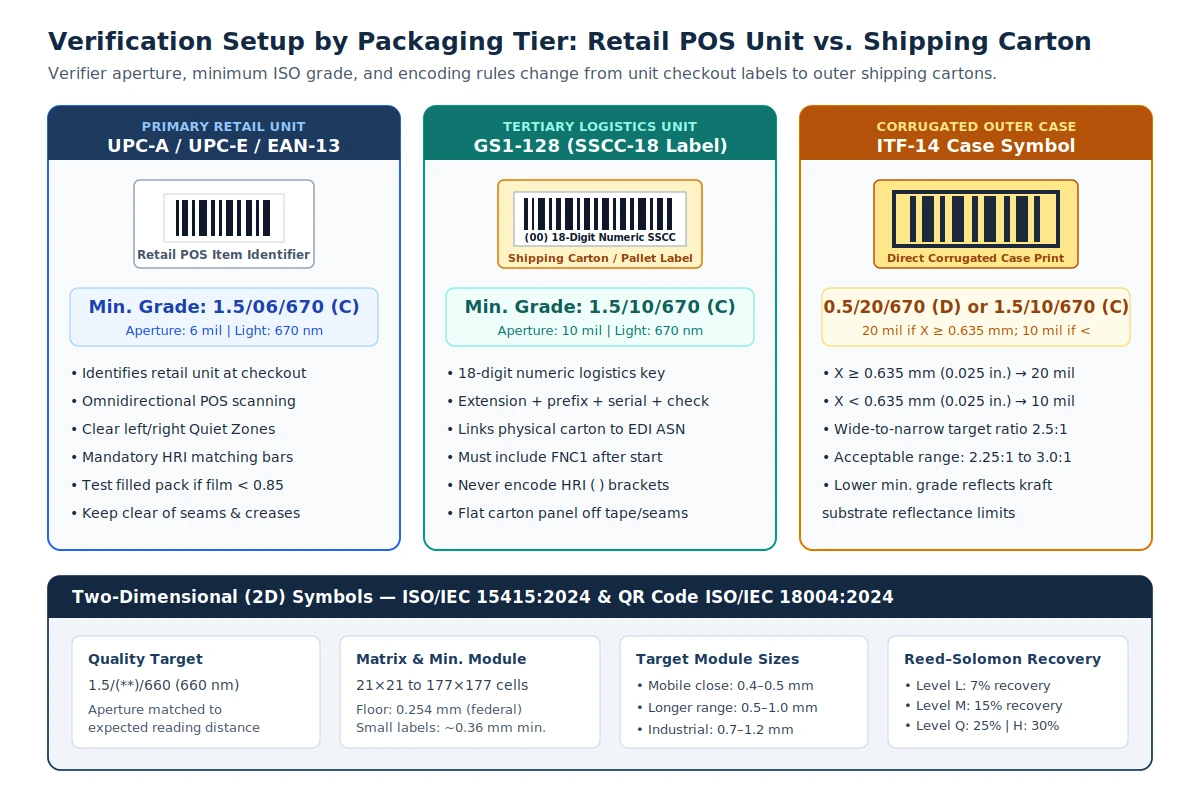
Mixing up unit-level and outer-carton verification settings is one of the fastest ways to misgrade labels. Evaluating an outer-carton GS1-128 SSCC label with a 6 mil POS aperture exaggerates minor substrate texture, while evaluating a compact retail UPC with a 10 mil or 20 mil aperture blurs narrow bars together and artificially collapses contrast.
| Packaging Tier | Linear Symbology | Verifier Aperture | Minimum ISO Grade | Encoding & Placement Requirements |
|---|---|---|---|---|
| Primary retail POS unit | EAN-8, EAN-13, UPC-A, UPC-E | 6 mil | Grade C (1.5/06/670) | Omnidirectional checkout; unobstructed left/right Quiet Zones; matching HRI; test filled pack if opacity < 0.85 |
| Tertiary shipping carton / pallet | GS1-128 (carrying 18-digit SSCC) | 10 mil | Grade C (1.5/10/670) | Must include FNC1 after start pattern; never encode HRI brackets around Application Identifiers; flat panel clear of seams |
| Corrugated case (larger module) | ITF-14 with X ≥ 0.635 mm (0.025 in.) | 20 mil | Grade D (0.5/20/670) | Target wide-to-narrow bar width ratio 2.5:1 (acceptable range 2.25 to 3.0); accommodates kraft board reflectance |
| Corrugated case (smaller module) | ITF-14 with X < 0.635 mm (0.025 in.) | 10 mil | Grade C (1.5/10/670) | Tighter grade and smaller aperture required when X-dimension drops below 0.635 mm; maintain flat placement off creases |
Two GS1-128 structural mistakes cause recurring receiving rejections even when print contrast scores Grade 4: omitting the FNC1 character immediately after the start pattern (which stops scanners from recognizing the symbol as GS1-128 and parsing Application Identifiers) and accidentally encoding the human-readable brackets displayed around Application Identifiers inside the barcode data string. Those brackets belong strictly in the HRI text line and must never be encoded in the bars.
What should a store label and receiving barcode spot-check checklist cover?
A practical retail barcode spot-check checklist separates physical placement, Quiet Zones, human-readable verification, contrast and opacity checks, and outer-carton encoding rules so receiving and backroom staff catch print degradation before stock hits checkout lanes.
Copy the inspection items below into your store receiving log and private-label print-run sign-off sheet:
| Check Area | What Store Staff Inspect | Pass Condition | Corrective Action on Fail |
|---|---|---|---|
| Quiet Zones & placement | Left/right clear margins and flat surface placement on unit or carton | Solid, light unobstructed Quiet Zones; label sits flat away from seams, tape, or perforations | Reposition label onto flat panel; widen artwork clear margin |
| Human-readable text (HRI) | Printed digits below bars vs. scanned output string | HRI is present and matches encoded data character-for-character | Quarantine batch; fix label template mapping before reprinting |
| Contrast & print defects | Bar darkness, crisp edges, and absence of spots or white voids | No jagged bars, ink specks in spaces, or light voids; dark ink clearly distinct from light stock | Check print pressure, ink/ribbon transfer, and substrate smoothness; re-verify on ISO verifier |
| Transparent film backing | Clear pouches, bottles, or window sleeves over colored goods | Tested on filled package; substrate opacity ≥ 0.85 or verified over ≤ 5% dark backing | Add opaque white backing panel behind symbol and re-test filled unit |
| Shipping carton SSCC & ITF-14 | GS1-128 SSCC structure, FNC1, and ITF-14 bar proportion on master cases | 18-digit SSCC parses cleanly without encoded HRI brackets; meets 1.5/10/670 (GS1-128) or 0.5/20/670 (ITF-14 ≥ 0.635 mm) | Fix label generator FNC1/AI settings; request fresh supplier verification report |
| Verifier calibration log | In-house ISO/IEC 15426-1 verifier maintenance record | Monthly calibration logged (plus after any aperture change); CCSTC check within six months; reports archived at least two years | Re-calibrate to traceable reference card or run CCSTC before signing off runs |